

 This newsroom convergence tool helps editors deliver content to multiple platforms from one source, increasing reach and efficiency while reducing costs.
All the information below is taken from three articles on Media Helping Media (MHM). They are:
- Creating a converged newsroom
- Introducing a converged newsroom strategy
- Convergence, workflows, roles and responsibilities
We suggest you read the articles above before proceeding in order to give you a better understanding of the process.
1. Quick convergence self‑check
Use the following questions to decide how far you are from a converged, superdesk‑driven newsroom.
- Do you have one central superdesk (physical or virtual) where intake, planning and output decisions are made together?
- Are intake and output clearly separated, with named people responsible for everything coming in and everything going out?
- Is there a single, shared planning system that all platforms (print, broadcast, digital, multimedia, archive, data) use?
- Do you routinely turn one verified set of facts into multiple treatments for different platforms and audiences?
- Can you track what each output area is doing and cross‑promote content in real time?
If most of the answers to the questions above are negative, please treat the rest of this tool as a checklist to design or refine your converged workflow strategy.
2. Map your superdesk roles
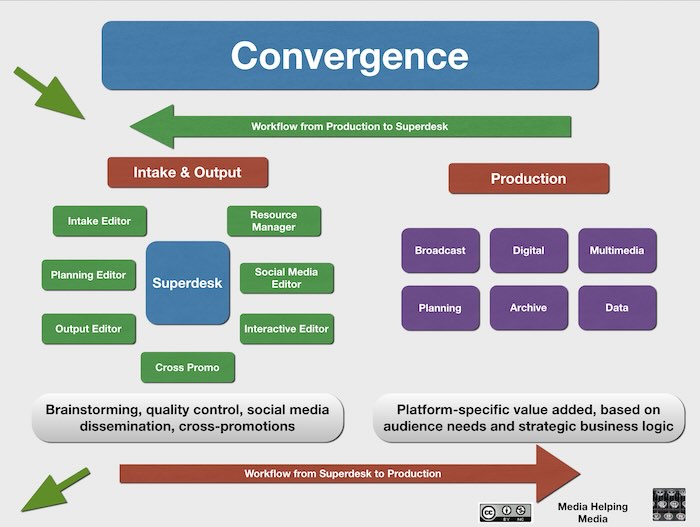
Anchor all your editorial planning, input, and output conversations on the roles clustered around a central ‘superdesk’.
The superdesk is the command and control area of your converged newsroom. Some call it the ‘news hub’ others the ‘news clog’. Whatever you name it doesn’t matter. All that matters is that everyone involved recognises the function and power of the superdesk.
The graphic above was created for an international broadcaster, but the system – minimally adapted – works for all print newsrooms too; the roles, responsibilities, and the workflow are the same.
For each role, ask “Who does this now? Do we need to change it?”
- Intake editor – Owns all incoming material (newsgathering, reporters, wires, social, competitors), filters and alerts the superdesk when priorities change.
- Output editor(s) – Own quality control, running orders, headlines, tone and deadlines for all content leaving the newsroom.
- Planning editor – Owns the forward planning diary (rather than the daily diary), knows about all original content in the pipeline as well as all follow‑up material available. Ensures the converged superdesk is aware of the wider editorial strategy.
- Interactive/social editor – Ensures all digital, mobile and social media platforms are updated, and feeds audience data and trends back to the desk.
- Resource manager – Allocates journalists, crews, editors, vehicles and equipment in line with superdesk decision making.
- Cross‑promotions producer – Spots material that can be repurposed and promoted across broadcast, digital and all other outputs. Informs all individual section editors about what others are doing and how that content can be exploited for maximum benefit on multiple devices.
If you are running a small newsroom, make a note of where one person must cover more than one role set out in the graphic. This will come in handy later.
3. Design the daily convergence workflow
Use the arrows in the graphic above – production → superdesk → production – as a simple meeting and decision cycle for your own news organisation.
- Intake sweep (start of shift, then rolling)
- Intake editor scans all sources, flags stories, and calls short stand‑ups at the superdesk when priorities shift.
- Resource manager proposes deployment options for each story.
- Superdesk decision block
- Around the superdesk, agree story weight, treatment and target platforms (print, broadcast, digital, multimedia, planning, archive, data).
- Assign a clear story owner on the output side and confirm what ‘done’ looks like for each platform.
- Production execution
- Production teams work to the agreed plan while the superdesk monitors intake for changes.
- Interactive/social editor updates digital first where appropriate and feeds performance and audience reactions back to the superdesk.
- Feedback and cross‑promotion
- Output editors and cross‑promotions producer identify where content can be reused, re‑versioned or teased on other platforms.
- Archive/data boxes in the graphic above become active: items are tagged, stored and made easy to retrieve for future coverage.
- Finalise your own convergence plan
- Create your own version of the graphic above (now tailored to meet your own specific requirements), polish it, then turn it into a bespoke working desk guide for your news organisation.
- Circulate the plan to all newsroom staff then arrange training sessions so that they are clear about their own roles and responsibilities in the process.
4. One‑page convergence canvas
Use this as a hand‑fillable template in workshops or management meetings.
- Superdesk set‑up
- Where is our superdesk (or equivalent)?
- Who sits there from: intake, output, planning, interactive, resources, cross‑promo?
- Roles and gaps
- Which boxes in the MHM convergence graphic do we already cover well?
- Which roles are missing or unclear, and what interim fixes can we adopt (dual roles, duty rotas, part‑time responsibilities)?
- Workflow rules
- How often does the superdesk meet formally, and how are emergency huddles triggered?
- What is the agreed rule for when a story must come back to the superdesk for a re‑decision (e.g. new facts, legal issues, safety, big audience spike)?
- Platform value‑add
- For each production box in the graphic (broadcast, digital, multimedia, planning, archive, data):
- What does this platform add that others cannot?
- What minimum treatment must every top‑tier story receive here?
- Success indicators
- Three quality indicators (e.g. fewer errors, stronger exclusives, better follow‑ups).
- Three efficiency indicators (e.g. less duplication, faster turnaround, better resource use).
Managers can review this canvas monthly to track progress and adjust roles or workflows.
5. Simple implementation sequence
A manager wanting to implement convergence can follow this short sequence as a ‘tool in action’.
- Run the quick self‑check with senior staff and discuss the biggest gaps.
- Print the convergence graphic; write names into each box and agree any interim dual roles.
- Define and publish the daily convergence workflow (Section 3) as a one‑page protocol.
- Fill in the one‑page convergence canvas with the whole team and agree three–six success indicators.
- Revisit the canvas after six or eight weeks, using performance and workflow issues from real stories to refine roles and processes.
The core steps are to define why you need a superdesk, decide who sits there, and then hard‑wire it into one shared workflow for intake, planning and output across all platforms.
So, in practical terms – what happens next. Have a look at this simple checklist.
- Clarify purpose and scope
- Define the editorial mission of the superdesk: one set of sourced, attributed, verified facts feeding every platform, not parallel silos.
- Decide which areas of the organisation it will control from day one (e.g. all breaking news plus top enterprise stories).
- Choose who sits at the desk
- Allocate seats for roles rather than individuals: intake editor, output editor(s), planning editor, interactive/social editor, resource manager and cross‑promo.
- In smaller newsrooms, agree which people will cover multiple roles but still keep each role clearly defined in your rota and documentation.
- Design the converged workflow
- Set the main news meetings around the superdesk where priorities, treatments and platform plans are agreed for the whole operation.
- Map a simple loop: intake gathers and flags → superdesk decides priorities and treatments → production executes on each platform → feedback returns to superdesk for updates and cross‑promotion.
- Align systems and tools
- Ensure everyone creates and updates content in one central content management system (CMS) or planning system so the superdesk can see the full picture in real time.
- Give superdesk editors access to breaking‑news tools that can update multiple devices and social channels from one action once a story is confirmed.
- Set rules, shifts and training
- Write short, visible rules: who can change priorities, when stories must come back to the desk (e.g. legal issues, major updates), and how disputes are resolved.
- Build staff rotas so that key roles are covered across the day, then staff in multi‑skilling and use of the CMS and planning tools to support the converged workflow.
And finally, good luck. This sounds like a difficult process, but it is quite easy to implement once everyone understands WHY it is happening.
Related material