


This tool enables newsroom managers to create a staffing rota that works for the business in terms of the best use of staff, and is also good for staff in terms of work-life balance.
The MHM rota is an adaptation of patterns that others have used in the past. It is probably best described as a fixed repeating shift rota using a lowest-common-multiple (LCM) cycle. Such as system is also called a cyclical rotating schedule or repeating 3‑week rota with built‑in float capacity and overlap.
A newsroom rota needs to focus effort on the peak output times of the day, be able to respond to large unexpected breaking news situations, and have the capacity needed for forward planning and the production of in-depth background material.
Managers need to ensure that all staff are fresh and rested for their shifts and that they are well-briefed and up to speed with the latest developments. The following news rota pattern does just that.
It was devised by the founders of Media Helping Media and has been adapted and used by leading international, national and regional publishers and broadcasters worldwide as well as smaller media organisations.
The rota pattern can be adapted according to available resources, output needs, and audience demand. The smallest news outlets we have built them for was an online news startup in the Middle East with six staff.
The 10-hour shift covering 24-hours
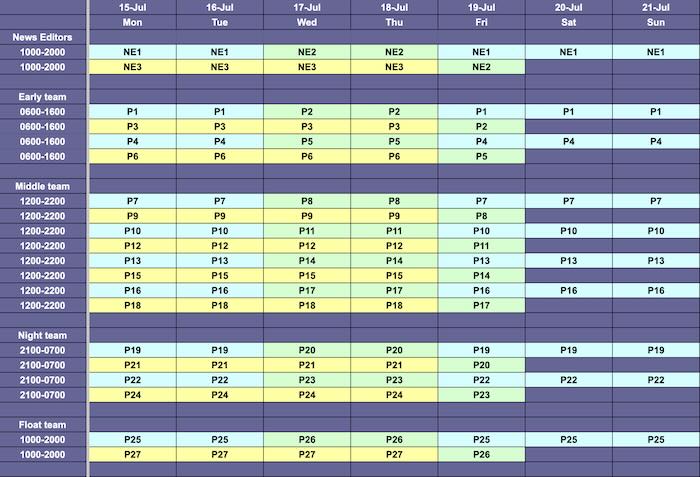
The rota pattern below is for a 24-hour rolling news operation. It’s based on staff working an average of 40-hour week over a three-week rotating schedule.
You will notice that the top line of shifts are 8-hour shifts. They are for senior news editors who supervise output.
The rota is designed to ensure continuous coverage, with built-in overlap between shifts for effective handovers and peak-time support.
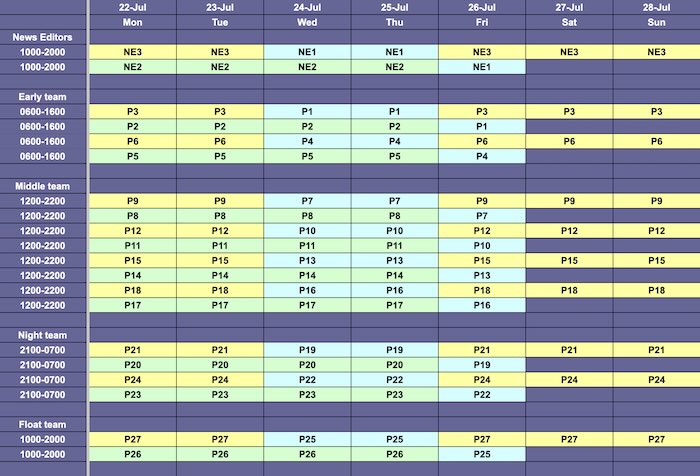
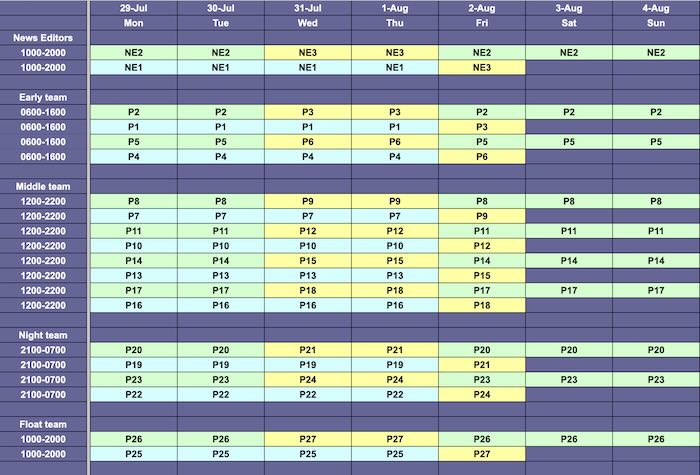
In the three graphics below the colours blue, green and yellow are used to show each sequence of shifts. These can be repeated or removed depending on need. The colours help management spot gaps that need filling and also helps staff find out what shifts they are on.
On the left are the roles – these will change depending on the type of news business you are in and the roles and responsibilities involved.
The codes – P1, P2, P3 etc are simply where you would place the initials of the staff members on shift. Use ‘find and replace’ across the entire spreadsheet to insert staff initials.
How it works
Over the course of the three weeks the repeating pattern means that all staff apart from the news editor will:
- Work one four-day week
- Work one five-day week
- Work one three-day week.
- They will work one weekend in three
- They will have one long weekend off in three (Friday, Saturday, Sunday)
- There is a ‘float’ shift for covering staff illness, leave, or periods of high demand.
- No more than two people can be off at any time (if you want to allow more people off at the same time you will need to add another line to the float).
Why the 10-hour rota is effective
- Continuous 24/7 Coverage: The rota ensures that all hours are covered with maximum effort focused on expected peak times.
- Predictability and fairness: The pattern is easy to understand and plan around, with predictable days off and a fair distribution of night and weekend shifts.
- Employee satisfaction: The extra day off and longer rest periods contribute to higher job satisfaction and lower burnout rates.
- Operational efficiency: Overlap periods allow for effective handovers, minimising errors and ensuring continuity of service.
How it works
The rotas were produced from a mathematical model which is fairly simple to use, once you understand the principles behind it.
Let us create a simple example. Let’s imagine you are running a 10-hour news operation with 12 members of staff, each working four ten-hour shifts a week over a three week period resulting in a total of 48 shifts available.
It is not practical to immediately allocate all of those 48 shifts to cover the news properly – because some of time members of staff will be on holiday or off sick. To allow for this you should calculate that each member of staff is available only 85 per cent of the time.
So instead of having 48 shifts available for your core operation, you have only 40. (If everyone is available on any particular week, they should all be scheduled but eight of the shifts should be non-essential – in other words the work will still get done if they are not present.)
So now you have 40 shifts available each week. You want to spread the work fairly and you want your 12 staff to be able to plan their lives, so you need a predictable work pattern.
You then find the lowest common multiple for these two numbers, 40 and 12. The lowest common multiple is 120 – which converts into three weeks of shifts.
You are now in a position to construct a three-week repeating work rota which should operate successfully and sustainably.
Implementation: The following steps assume the newsroom is working 10 hours a day.
- Define staffing needs and roles
- Roles: List every role that must be covered each hour (e.g. news producers, video editors, social media, background features, forward planning, video editor).
- Core: Decide which shifts are core (must be staffed) and which are non‑essential or “nice to have” (e.g. extra background writers during quieter periods).
- Set basic shift parameters
- Shifts: Choose standard shift length (10 hours) and target working week (e.g. 4×10‑hour shifts = 40 hours).
- Pattern: Decide your pattern principle. in the MHM example, each person works one 4‑day week, one 5‑day week, one 3‑day week across the cycle, with one weekend in three and one long weekend off.
- Calculate capacity using availability
- Elements: Let S = number of staff, H = shifts per person per week, A = availability (e.g. 0.85), T = required core shifts.
- Compute:
- Total shifts = S × H
- Core shifts = Total shifts × A
- Spare shifts = Total shifts − core shifts
- Determine the rota cycle
- Start with how many staff you have and how many core shifts you need.
- In the example, there are 12 people on the rota and you need 40 essential shifts covered each week.
- Work out the common pattern number.
- You look for a number that both 12 (staff) and 40 (core shifts) fit into exactly with no remainder.
- For 12 and 40, that number is 120.
- Turn that into weeks.
- Take 120 and divide by the 40 core shifts you need each week: 120 ÷ 40 = 3.
- That tells you your rota pattern will repeat every 3 weeks.
- Fit in the other numbers you already worked out.
- With 12 staff doing 4 shifts each, there are 48 shifts in theory.
- Assuming people are available 85% of the time, you can rely on about 40 of those as core shifts, with roughly 8 spare shifts as a buffer.
- The maths shows that, with 12 people and 40 essential shifts a week, the fairest repeating rota pattern is a 3‑week cycle.
- Start with how many staff you have and how many core shifts you need.
- Design the repeating pattern
- Build a 3‑week grid of shifts, using colour‑coded sequences (e.g. blue, green, yellow) that represent patterns of early, late, nights, or specific roles.
- Ensure that across the 3 weeks each person gets: one 3‑day week, one 4‑day week, one 5‑day week; one weekend on, one long weekend off; and a fair distribution of nights and unpopular shifts.
- Add overlap and a float line
- Stagger start times to create overlap between shifts at key handover and peak periods, improving continuity and resilience.
- Reserve a ‘float’ shift each day (or several per week) explicitly for sickness, holidays, or unexpected spikes; set a rule such as “no more than two people off at once without adding another float line”.
- Populate with names and finalise rules
- Replace placeholders (P1, P2… or coloured blocks) with actual staff initials, making sure everyone rotates through the pattern equitably.
- Write simple rules: swap policy, minimum notice for changes, maximum consecutive nights, and how non‑essential shifts are treated if float capacity is needed.
- Test, brief, and adjust
- Run a dry‑run of the rota for a hypothetical 3‑week period and check coverage, handovers, and rest periods.
- Brief staff on how the pattern works, when their weekends and long weekends fall, and how to request leave; then adjust minor details while keeping the core 3‑week cycle intact.
Benefits for staff
The system is deliberately structured to be predictable and fair for individuals.
- More rest and life planning
- Each person experiences one 3‑day, one 4‑day, and one 5‑day week in the cycle, plus one long weekend off in three (Friday–Sunday), which supports work–life balance and recovery.
- Predictable rotation allows staff to plan family time, appointments, and travel around known nights and weekends on/off.
- Fair distribution of unpopular shifts
- Night and weekend duties are distributed across the 3‑week cycle rather than clustering on a small group, reducing resentment and burnout.
- Built‑in float capacity means staff are less likely to be press‑ganged into extra shifts at short notice when someone phones in sick.
- Better handovers and less stress
- Overlapping 10‑hour shifts mean staff do not walk into a cold start; they share time with colleagues at changeover, which improves briefing and reduces anxiety.
- Clear, repeated patterns help people internalise routines, so they spend less mental energy just working out when they are on duty.
Benefits for the business
Operationally, this is a sustainable and scalable rota model for any 24/7 or long‑hours newsroom.
- Strong, continuous coverage
- The pattern is designed for 24‑hour rolling operations, ensuring all hours are staffed and peak times are reinforced with overlapping shifts and non‑essential support.
- Spare shifts (from the 15% availability allowance) act as a built‑in buffer, allowing the operation to absorb sickness and holidays without collapsing coverage.
- Efficiency and simplicity
- The LCM‑based 3‑week cycle simplifies planning: HR, finance, and editors can model costs, leave, and staffing consistently over a stable pattern.
- A single master spreadsheet can be adapted with find‑and‑replace (dates, roles, staff initials) and extended or reduced by repeating or removing colour‑coded blocks.
- Better quality and resilience
- Overlaps at handover reduce errors and missed stories because outgoing staff can brief incoming colleagues on developing lines and background material.
- The pattern explicitly protects staff rest, which tends to support higher quality journalism, fewer mistakes, and lower turnover in demanding 24/7 environments.
Download the rota
To adapt and use this rota pattern do the following:
- Click here to download a spreadsheet version of the rota
- Save the dowloaded rota as a ‘master’ copy (in case you make any mistakes).
- Adapt it to your own needs by using ‘find & replace’ to:
- Change the dates at the top of the rota
- Change the names of the shifts you require
- Delete any groups of the three coloured shift patterns depending on your own resources and needs
- Copy and repeat groups of the three coloured shift patterns if you want to expand the rota
- Rename the shifts and roles as you wish
- Give the rota a name then save it.